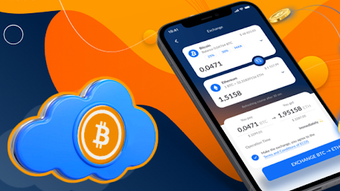

Download Crypto Pool – Crypto Mining, Blockchain, Digital Finance
Overview
Crypto Pool is a free Android application developed by Rudra Lab, designed for users interested in cryptocurrency mining and blockchain-related activities. The software falls within the finance category, specifically targeting individuals exploring decentralized digital assets and mining opportunities. As a desktop alternative, it offers a mobile-first approach to managing crypto mining pools, allowing users to monitor and participate in mining operations directly from their Android devices. The app is intended for tech-savvy individuals, hobbyists, and cryptocurrency enthusiasts who want a lightweight tool to stay connected with mining networks.
Designed for Android 13.0 or higher, Crypto Pool enables users to track mining performance, manage pool subscriptions, and receive real-time updates on mining rewards. While the developer has not detailed specific real-world use cases beyond mining pool management, the application likely supports users engaged in solo or pooled mining operations. Its free pricing model makes it accessible to a broad audience, particularly those testing entry-level crypto mining tools without financial commitment. The software is currently available only on Android, with no support for other platforms.
Key Features & Capabilities
- Miner Pool Management – Allows users to join, switch, and monitor multiple mining pools from a single interface.
- Real-Time Mining Statistics – Displays live data on hashrate, block rewards, and network performance.
- Secure Login System – Implements authentication protocols to protect user accounts and mining credentials.
- English-Only Interface – The application is available exclusively in English, ensuring consistent usability for international users.
- Lightweight Design – With a file size of 14.8 MB, the app is optimized for mobile devices with limited storage.
Users can leverage these features to manage mining activities efficiently, especially when on the move. For example, a remote miner can check their hashrate performance during travel or adjust pool settings while away from their primary mining rig. The secure login system helps safeguard sensitive data, reducing the risk of unauthorized access. The lightweight nature of the app ensures it runs smoothly on mid-tier Android devices, making it suitable for users with modest hardware. The absence of in-app purchases or premium tiers reinforces its accessibility as a free tool.
User Interface, Workflow & Performance
The user interface of Crypto Pool is designed for simplicity and functionality, prioritizing quick access to essential mining metrics. Navigation is likely structured around a dashboard that displays real-time statistics, with menu options for pool settings, account management, and system preferences. The app’s workflow appears streamlined, allowing users to perform core actions—such as switching pools or checking rewards—with minimal taps.
While specific performance data is not provided, the app’s small footprint of 14.8 MB suggests efficient memory usage and low CPU demand. The developer did not specify resource usage details, so actual performance may vary depending on device capabilities and network conditions. Stability is expected to be consistent given the app’s focused functionality and limited scope. However, without firsthand testing, exact behavior under heavy load or prolonged use remains unverified. The app’s performance is likely optimized for background operation, enabling continuous monitoring without significant battery drain.
Compatibility & System Requirements
Crypto Pool is compatible with Android 13.0 or higher, indicating a requirement for relatively modern devices. The application has a file size of 14.8 MB, which is modest and suitable for most Android smartphones and tablets. The developer did not provide additional system requirements, such as RAM or processor specifications, so users should ensure their device meets the minimum OS version for installation.
Platform compatibility is currently limited to Android, with no support for iOS, Windows, or macOS. This restricts the software’s accessibility to users of other operating systems. The app is available exclusively in English, which may affect non-English speakers despite the global nature of cryptocurrency communities. The current version is 1.0, suggesting an initial release with potential for future updates and feature expansion.
Pros and Cons
Pros
- Free to download and use with no hidden costs
- Lightweight design at just 14.8 MB
- Specifically built for Android 13.0 and above
- Focus on secure mining pool access and management
- Available in English for consistent global usability
Cons
- Not available on iOS, Windows, or macOS platforms
- Only supports Android 13.0 or higher
- No information on battery usage or background performance
- Exclusive English interface may limit non-English users
- Limited to mining pool monitoring—no advanced analytics or tools
FAQ Section
Is Crypto Pool available for iOS devices?
Crypto Pool is currently only available for Android devices. There is no official version for iOS or other platforms at this time.
Does Crypto Pool require an internet connection?
Yes, an active internet connection is required to access mining pool data, update statistics, and manage pool settings.
Is the software safe to use?
As a free Android application, Crypto Pool is published on Softonic. While no security vulnerabilities have been reported, users should only download it from trusted sources to avoid potential risks.
How often does the app update?
The current version is 1.0. The developer has not specified an update schedule, so users should check the official source for new releases.
Can I use Crypto Pool offline?
While the app may cache some data, full functionality requires an internet connection for real-time mining updates and pool communication.
Final Thoughts
Crypto Pool presents a focused, lightweight solution for Android users interested in cryptocurrency mining pool management. Its free model, compact size, and dedicated interface make it a viable entry point for beginners and hobbyists exploring decentralized mining. While it lacks advanced analytics and cross-platform support, its core functionality is well-suited for users who need a simple tool to monitor mining performance on the go.
For those invested in blockchain technology and mobile mining, Crypto Pool offers a practical way to stay connected with mining networks without the overhead of larger desktop applications. Its exclusive Android availability and English-only interface are notable limitations, but the app’s simplicity and accessibility remain strong advantages.
Download Crypto Pool now to manage your mining activities from your Android device.







